💻 Computer System and Organization
📖 Introduction
A Computer System is a combination of hardware and software that works together to process data and produce meaningful information.
Computer Organization refers to the internal structure and operational units of a computer system.
🧩 Components of Computer System
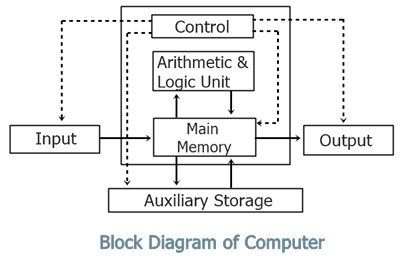
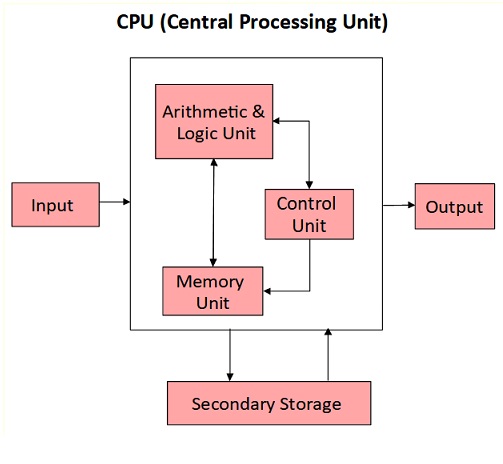


1. Input Unit
Used to enter data into the computer
Converts user input into machine-readable form
Examples: Keyboard, Mouse, Scanner
2. Central Processing Unit (CPU)
Known as the brain of the computer
Performs all calculations and processing
CPU consists of:
ALU (Arithmetic Logic Unit) – Performs calculations
CU (Control Unit) – Controls all operations
Registers – Temporary storage
3. Memory Unit
Stores data and instructions
Types of Memory:
Primary Memory (RAM, ROM)
Secondary Memory (Hard Disk, SSD, Pen Drive)
4. Output Unit
Displays the result of processing
Examples: Monitor, Printer, Speaker
⚙️ Computer Organization


Computer Organization explains how different components of a computer system are interconnected and work together.
Key Concepts:
Instruction Execution Cycle (Fetch → Decode → Execute)
Data Flow between CPU and Memory
Control Signals and Timing
🔄 Instruction Cycle
Fetch – Instruction is taken from memory
Decode – Instruction is understood by CPU
Execute – Operation is performed
🧠 Types of Computer Architecture
1. Von Neumann Architecture
Uses single memory for data and instructions
2. Harvard Architecture
Separate memory for data and instructions
⚡ Difference: Computer System vs Organization
| Computer System | Computer Organization |
|---|---|
| Deals with overall system | Deals with internal working |
| Includes hardware & software | Focuses on hardware structure |
| User-oriented | Machine-oriented |
🎯 Important Points for Exams
CPU = ALU + CU + Registers
RAM is volatile, ROM is non-volatile
Fetch-Decode-Execute cycle is basic process
Input → Process → Output cycle
❓ MCQs (Practice Questions)
Q1. CPU का पूरा नाम क्या है?
A. Central Process Unit
B. Central Processing Unit ✅
C. Computer Processing Unit
D. Control Processing Unit
Q2. ALU का कार्य क्या है?
A. Data storage
B. Input देना
C. Arithmetic & Logical operations ✅
D. Output देना
Q3. RAM किस प्रकार की memory है?
A. Non-volatile
B. Volatile ✅
C. Permanent
D. Secondary
Q4. Computer का brain किसे कहा जाता है?
A. RAM
B. Hard Disk
C. CPU ✅
D. Monitor
Q5. Fetch-Decode-Execute cycle किससे संबंधित है?
A. Input unit
B. Output unit
C. CPU ✅
D. Printer
Q6. ROM का उपयोग किसलिए होता है?
A. Temporary storage
B. Permanent storage ✅
C. Processing
D. Output
Q7. Control Unit का कार्य क्या है?
A. Calculation करना
B. Control operations ✅
C. Data store करना
D. Print करना
Q8. Secondary memory का उदाहरण कौन सा है?
A. RAM
B. Cache
C. Hard Disk ✅
D. Register
Q9. Harvard architecture में क्या अलग होता है?
A. CPU नहीं होता
B. Separate memory for data & instruction ✅
C. Input नहीं होता
D. Output नहीं होता
Q10. Computer system का मुख्य कार्य क्या है?
A. केवल input लेना
B. केवल output देना
C. Data processing ✅
D. केवल storage
📌 Conclusion
Computer System and Organization is a fundamental topic for all competitive exams. Understanding components, architecture, and working principles helps in solving objective questions easily.


No comments:
Post a Comment